Big Update: Scorekeeping, Reports, and a Board That Finally Looks Like a Ballfield

Yes. It's a big update — and an honest account of what's finished, what's rough, and what it's already good for.
If you've been using BenchBoard to run a lineup and manage a defense, the last few weeks have changed what the app is. It's no longer a board that helps you set a lineup and then gets out of the way once the game starts. I've seen a number of rising apps doing things to address fairplay. It now scores the game with you, pitch by pitch, and turns what it records into reports you can actually use on Monday - and a good chunk of coaches have requested for this.
This is a long post because it's a lot of change. Here's the short version:
- Scorekeeping is the headline. There's a real pitch-by-pitch scorekeeper now, with a live field you drag the ball onto. It's the biggest thing we've built.
- Reports are live. Six of them, built from what you actually recorded — playing time, position rotation, fairness, and pitcher/catcher workload.
- The board looks different. New field diagrams, new position cards, a cleaner layout on every screen size.
- Scorekeeping still needs work. It's workable and it's valuable, but it isn't polished. I'd rather tell you that up front than have you find out in the third inning or from playing around. Alot of choreography and animations still aren't done as well as some gaps in that need to be addressed - to which there's still a good chunk of them.
The Big One: Scorekeeping

Two modes, one board
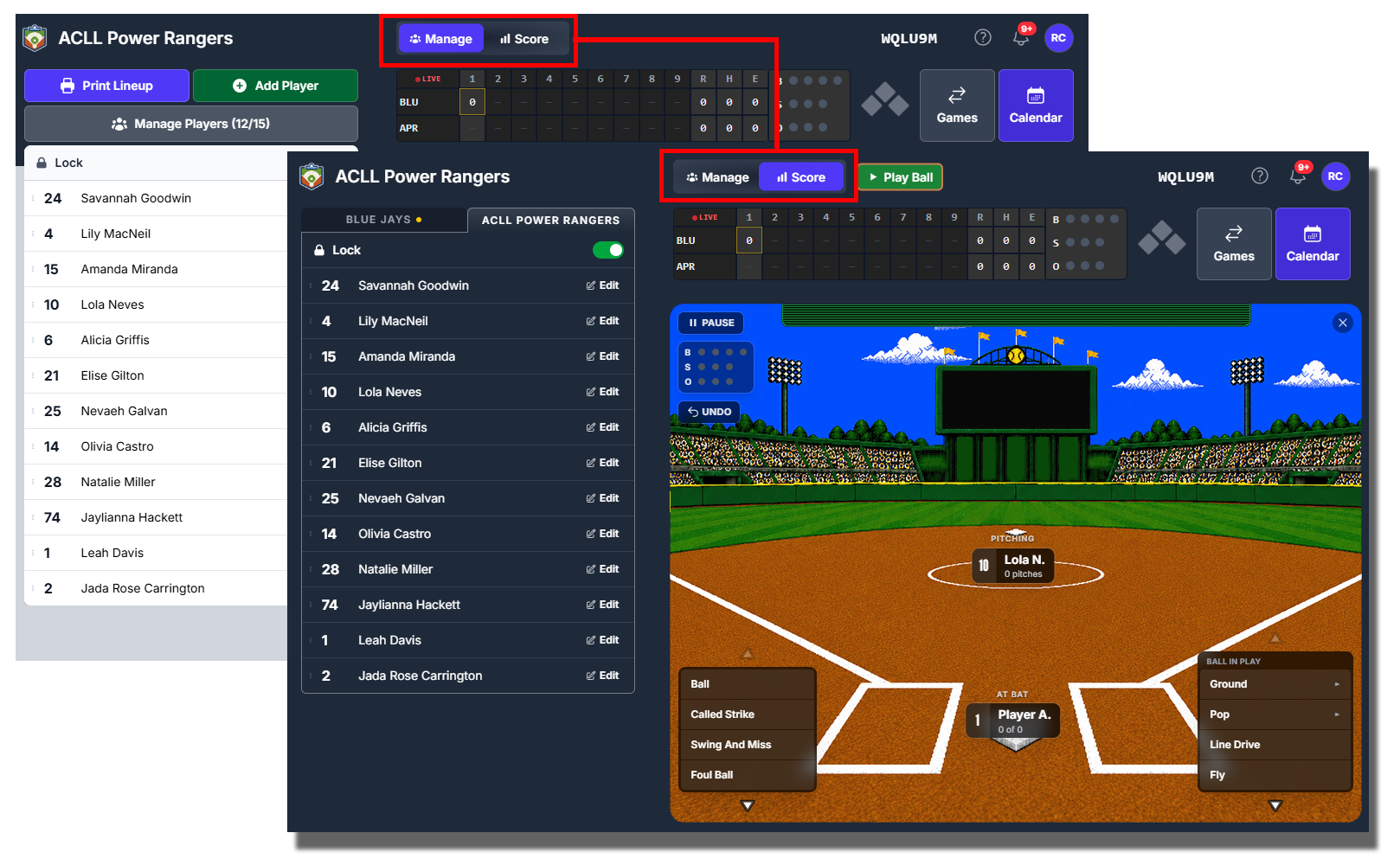
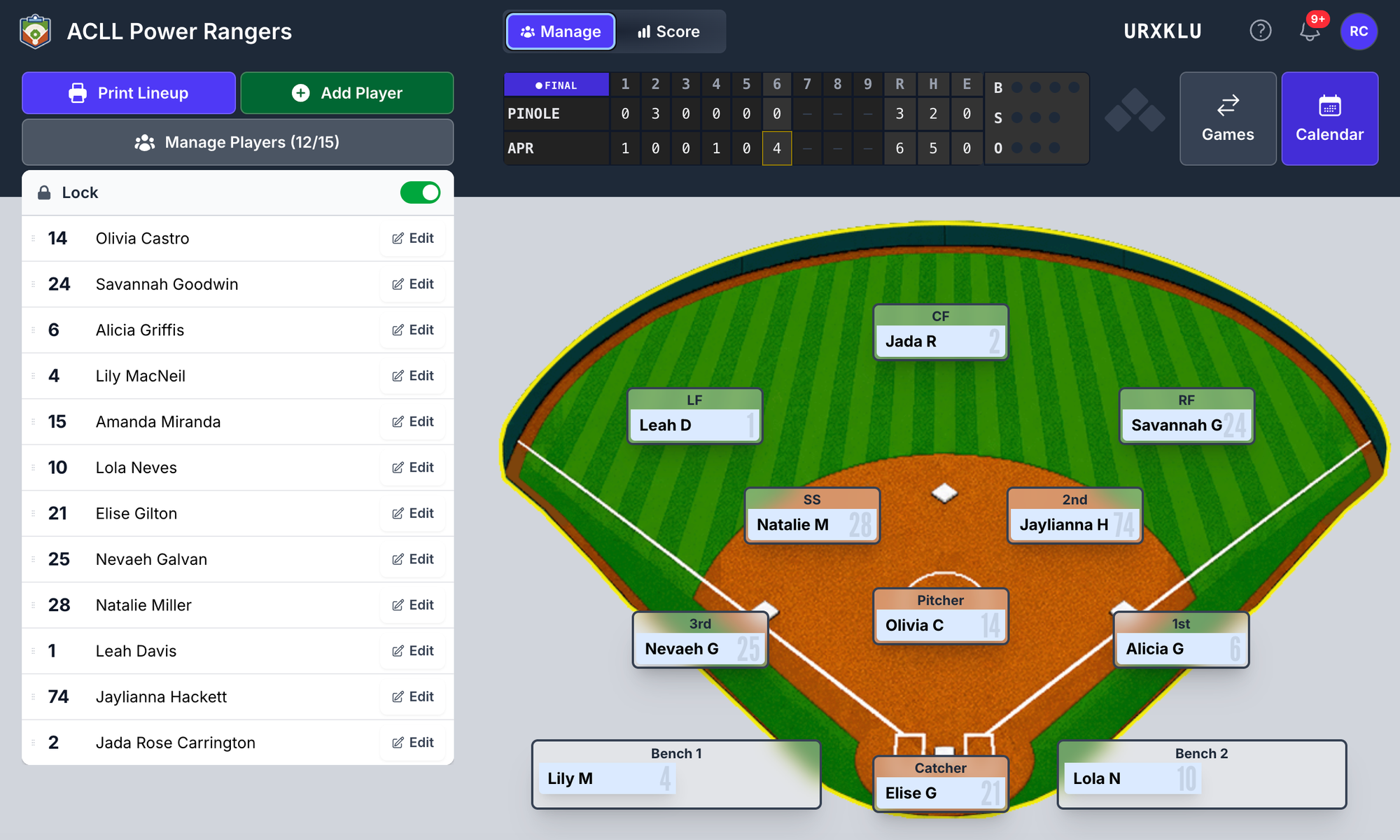
The board you already know — drag players onto positions, set your batting order — is now Manage mode.
There's a second mode next to it: Score.

Hit Score and the board rearranges itself. The lineups go dark and move to the sides, the field lifts into the middle, and the count and bases tuck up next to the scoreboard. Same board, same players, different job. You're not navigating to a separate "scorekeeping screen" and losing your context — the board becomes the scorekeeper.
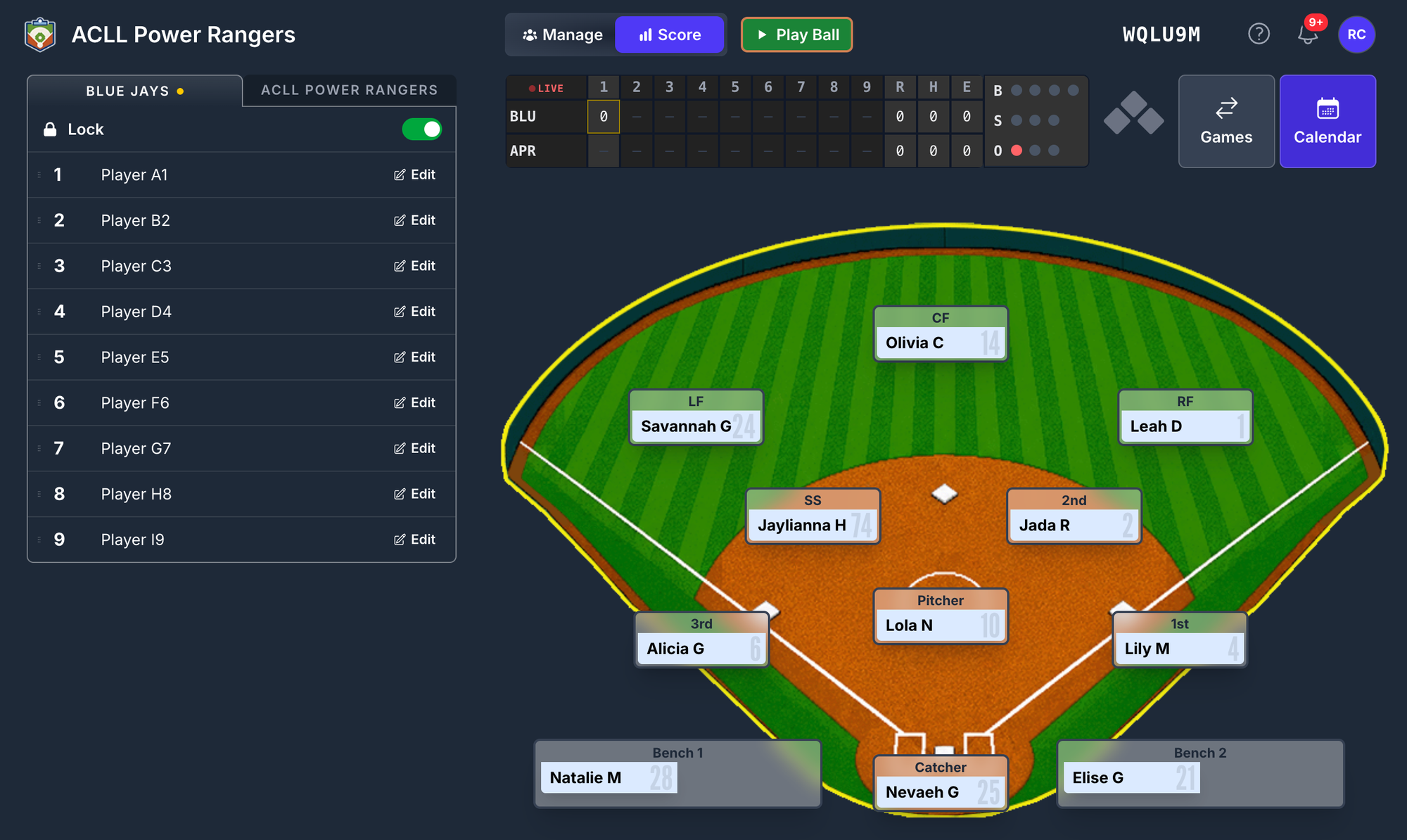
Manage mode is still there and still does everything it did. You switch back with one tap.
Pitch by pitch
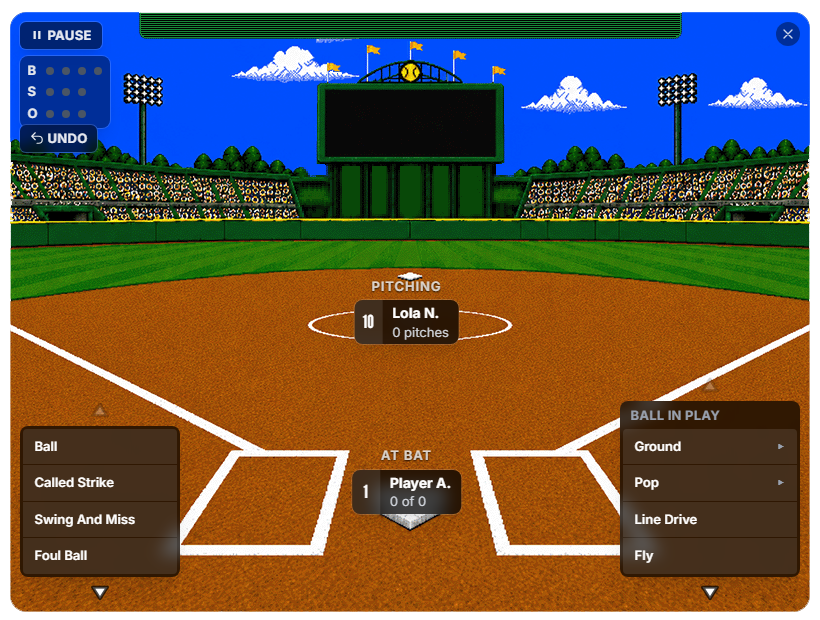
Tap Play Ball and you get the pitcher-versus-batter view: the two players who matter right now, big, with the count between them.
Every pitch is one tap. Ball, Called Strike, Swing and Miss, Foul Ball on the first page. Wild Pitch, Passed Ball, Hit By Pitch on the second. The rarer rulings — Catcher's Interference, Batter's Interference, Intentional Walk — live on a third page so they're there when you need them and out of the way when you don't.
The engine owns the rules, not the UI. Four balls is a walk, and it commits without asking you to confirm something you already told it. Strike three is a strikeout — and if a dropped third strike is actually live (two strikes, first base open with under two outs, or first occupied with two outs), that option appears on its own. It doesn't sit there confusing you the rest of the time.
Pitch counts are recorded per pitcher, per at-bat, for real. That matters later — see the workload report.
Ball in play: drag it where it went
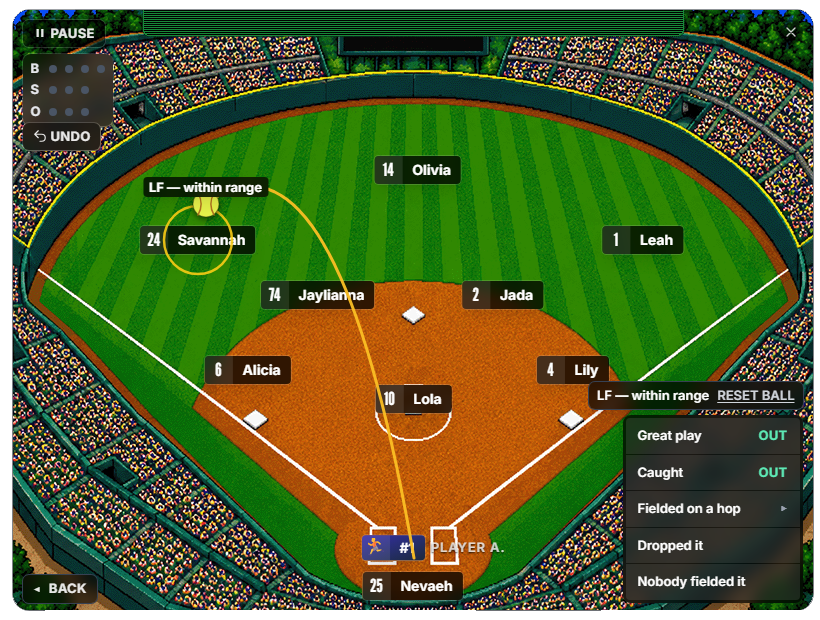
This is the part that's genuinely different from every other scorekeeping app I've used.
When a ball is put in play, you don't pick "Single" from a list. You pick how it was hit — Fly, Line Drive, Pop Fly, Pop Up, Ground Rocket, Normal Ground, Slow Roller, Chopper, Bunt — and then you drag the ball to where it went on the field.
That single gesture does a lot of work. The app knows the trajectory profile, the landing spot, and which fielder is closest to it. From that it offers you the menu that actually applies. Drag a fly ball to the left fielder and you get catch/drop options. Drag a slow roller to the third-base side and you get the infield options. You're not scrolling past twenty irrelevant choices to find the one that happened.
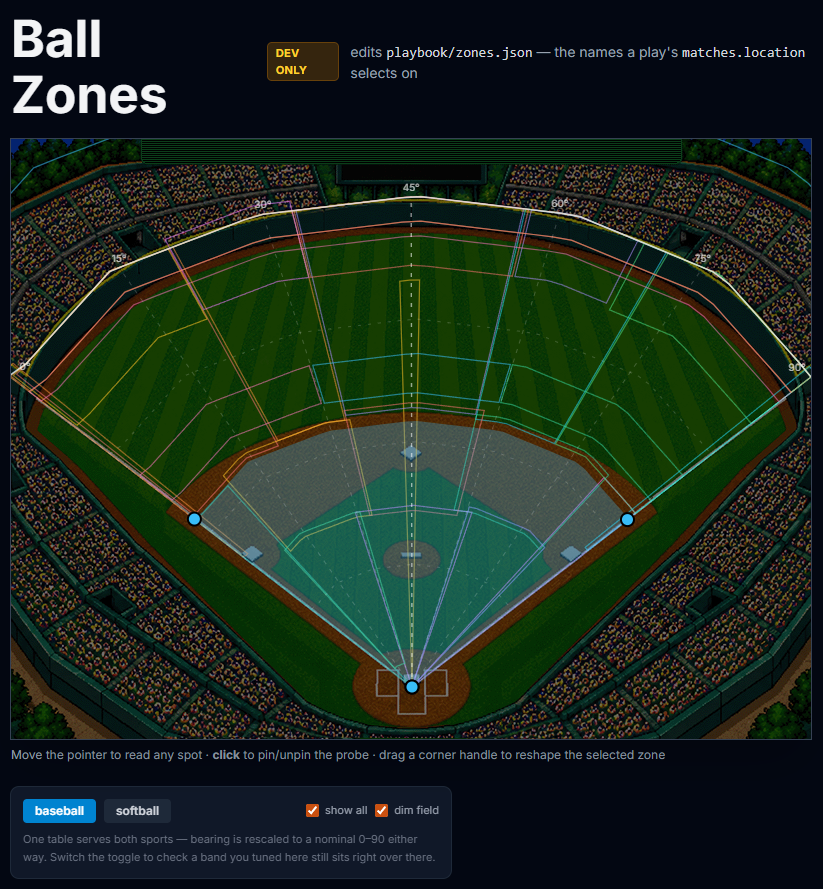
The field is divided into 28 named zones behind the scenes, so "where it went" is recorded as real data — not just "single to left." That's what will make batted-ball reports possible later without you doing any extra work now.
Sorting out the runners
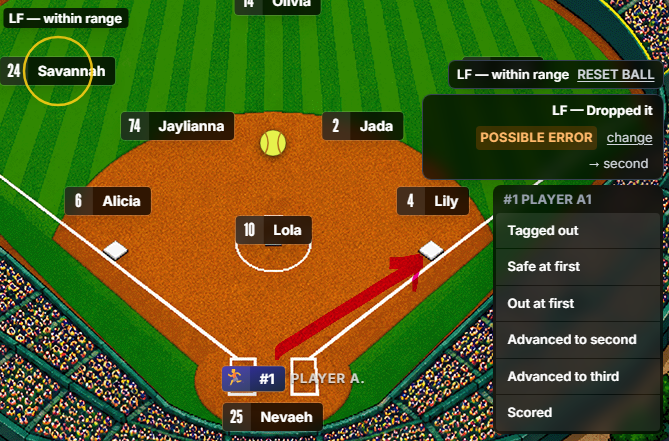
When a play involves runners, you get a panel with one column per runner, plus the batter. Each column shows that runner's name, where they're looking to go, and a list of what could have happened — with the app's best guess already selected.
If the app guessed right, you hit Commit. If it didn't, you tap the right option in that runner's column and then hit Commit. One decision per runner, one commit for the whole play, instead of a chain of prompts.
It also refuses to record contradictions. If you tell it two things that can't both be true, it won't quietly save something wrong.
It Animates
Benchboard has animations that help lay out the play
When you commit a play, the field plays it back. The ball flies, the fielders move, the runners run, and an OUT! or SAFE! stamp lands at the end. A real 6-4-3 double play runs as one synchronised sequence — the ball beats the runner to first, because the timing is computed from actual distances, not guessed.
This is not decoration. When you're scoring fast and you're not sure the app understood you, watching the play back is how you catch a mistake in two seconds instead of finding it in the box score an hour later.
Undo, and why it works
Every pitch and every play is stored as an event in a log, in order. Nothing about the game state is stored as a number you'd have to keep in sync — the score, the count, the outs, who's on base are all derived from that log.
That means Undo is real. Remove the event and everything that depended on it goes with it. There's no second copy of the outs sitting somewhere getting out of step.
That design paid off directly in this release — see v0.8.9.63 below.
Where it's rough
Being straight with you:
- It needs a cleanup pass. Menus are inconsistent in places. Some paths have more taps than they should. A few screens are tighter than they need to be on smaller tablets.
- Not every scenario is wired. The common ones are solid. Unusual defensive sequences — certain relay and cutoff situations, some appeal plays — either aren't there yet or take more taps than they should.
- The Box Score doesn't currently have a way in. The data is there; the button isn't. That's on the list.
- Reports cover playing time and workload, not batting stats. Hits, RBIs, and averages are recorded per game but aren't surfaced as season totals yet.
What it is good for right now: running a real game, pitch by pitch, and coming out the other side with an accurate record of who played where, for how long, and how hard your battery worked. I've scored full innings through it and the scoring was trustworthy.
The Reports - Big Update #2
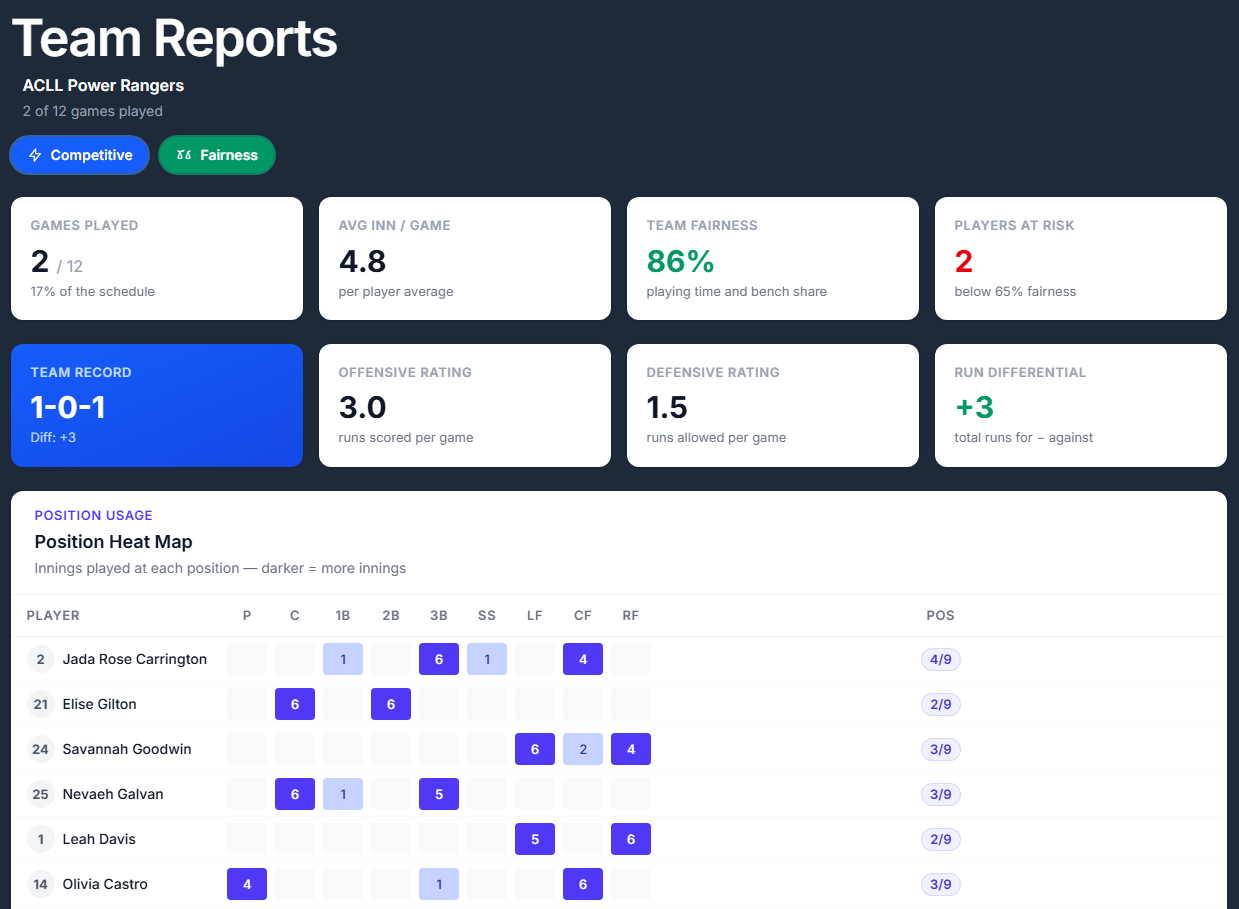
Reporting is live and built entirely from games you've actually scored. No manual entry, no spreadsheet.
Four tiles across the top give you the shape of your season at a glance: Games Played (and what percentage of your schedule that is), Average Innings per Game per player, Team Fairness, and Players at Risk — how many kids are sitting below 65% on fairness.
Then the reports themselves.
1. Position Heat Map
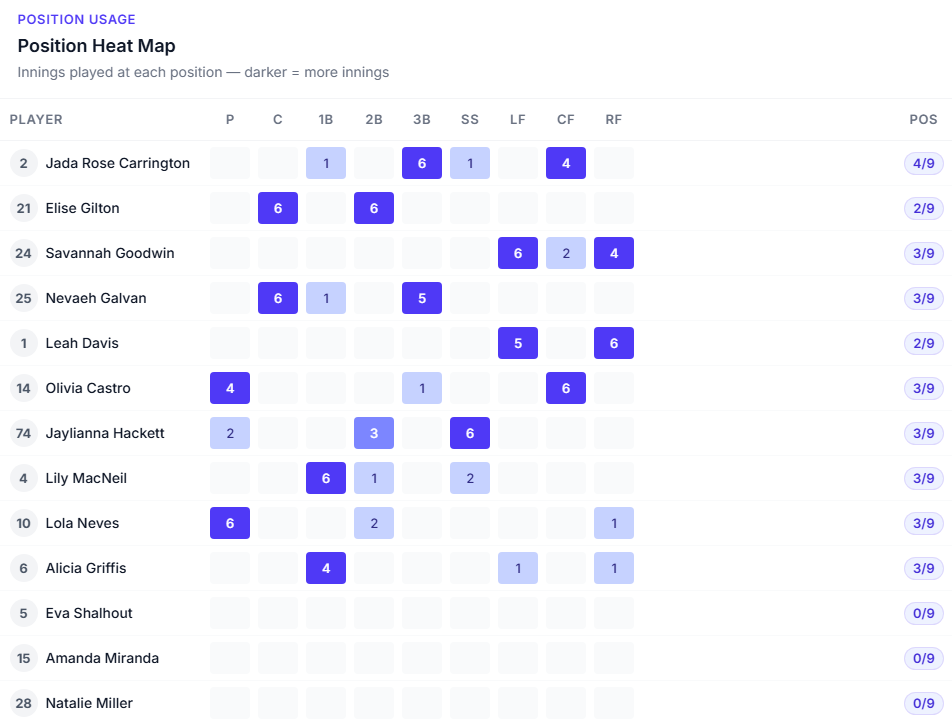
A grid: every player down the side, every position across the top, innings in each cell. Darker cell means more innings there.
Cells where a player has never played are left blank rather than showing a zero — a grid full of zeros is much harder to read at a glance than a grid with holes in it. On the right, each player gets a count of how many different positions they've played out of the total.
This is the report that answers "am I actually rotating them, or do I just think I am?" The answer is usually visible in about four seconds.
2. Playtime Distribution
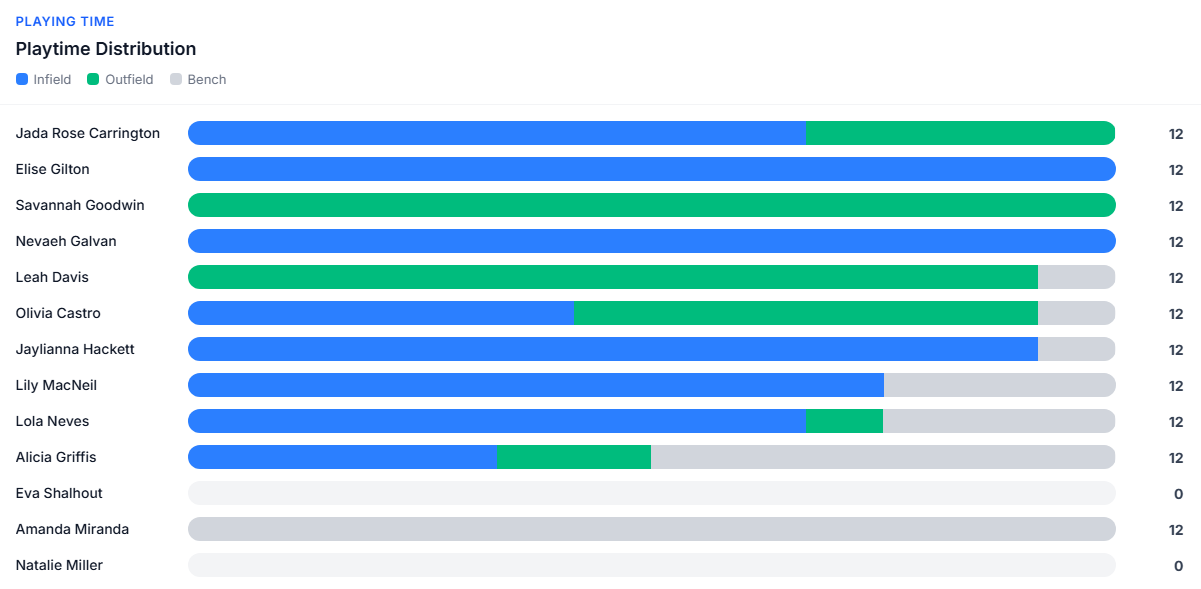
One horizontal bar per player, split into four segments: infield (blue), outfield (green), other (amber, for anything that isn't standard infield/outfield — the Rover in ten-player defense, for instance), and bench (grey). Total innings on the right. In this example, we don't have amber since we're doing 9 player defense.
The bars are all on the same scale, so a short bar means a kid who isn't getting on the field. The color split tells you whether their innings are concentrated in one part of the field.
3. Player Fairness Breakdown
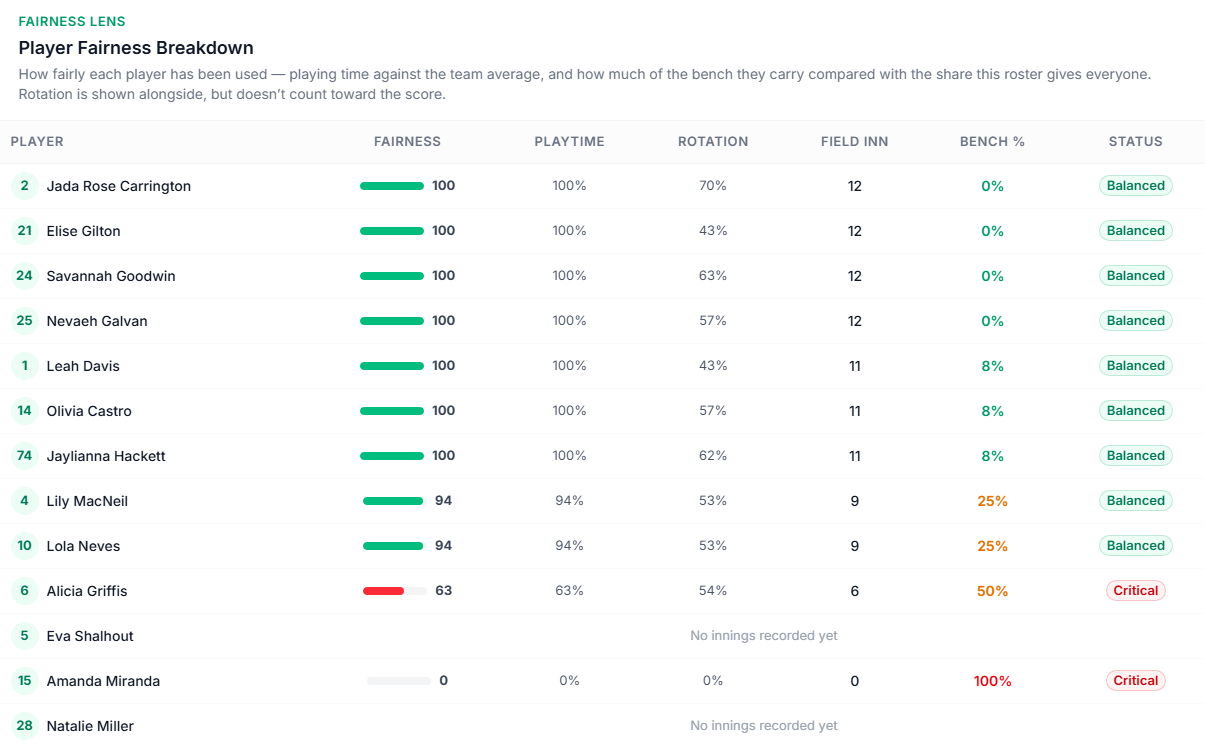
A per-player fairness score, with the ingredients shown next to it: playing time against the team average, and how much of the bench that player is carrying compared with the share this roster size gives everybody.
Rotation is shown but deliberately doesn't count toward the score. This one's worth explaining, because it used to work the other way and it made the page useless. A kid who plays every inning at one position is getting a completely fair share of playing time. The old formula scored that as "Critical" because they weren't rotating — which is a coaching question, not a fairness question. Now rotation sits in the table next to the score where you can see it and make your own call, and the score means what it says.
4. Fatigue & Load
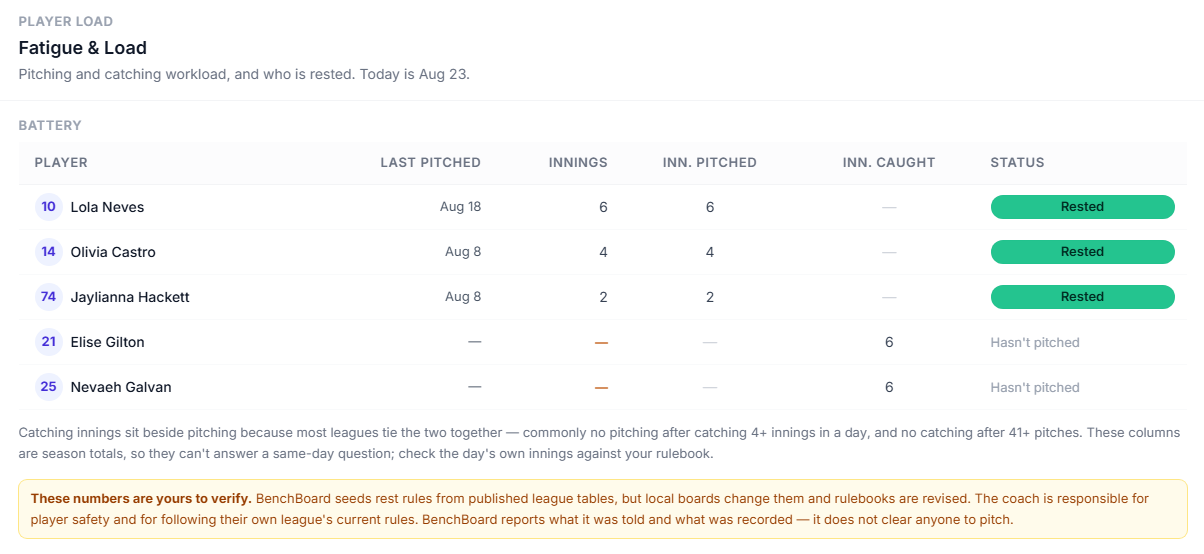
Pitching and catching workload, and who's rested.
For each player: when they last pitched, their pitch count, innings pitched, innings caught, and a status bar showing whether they've had enough rest.
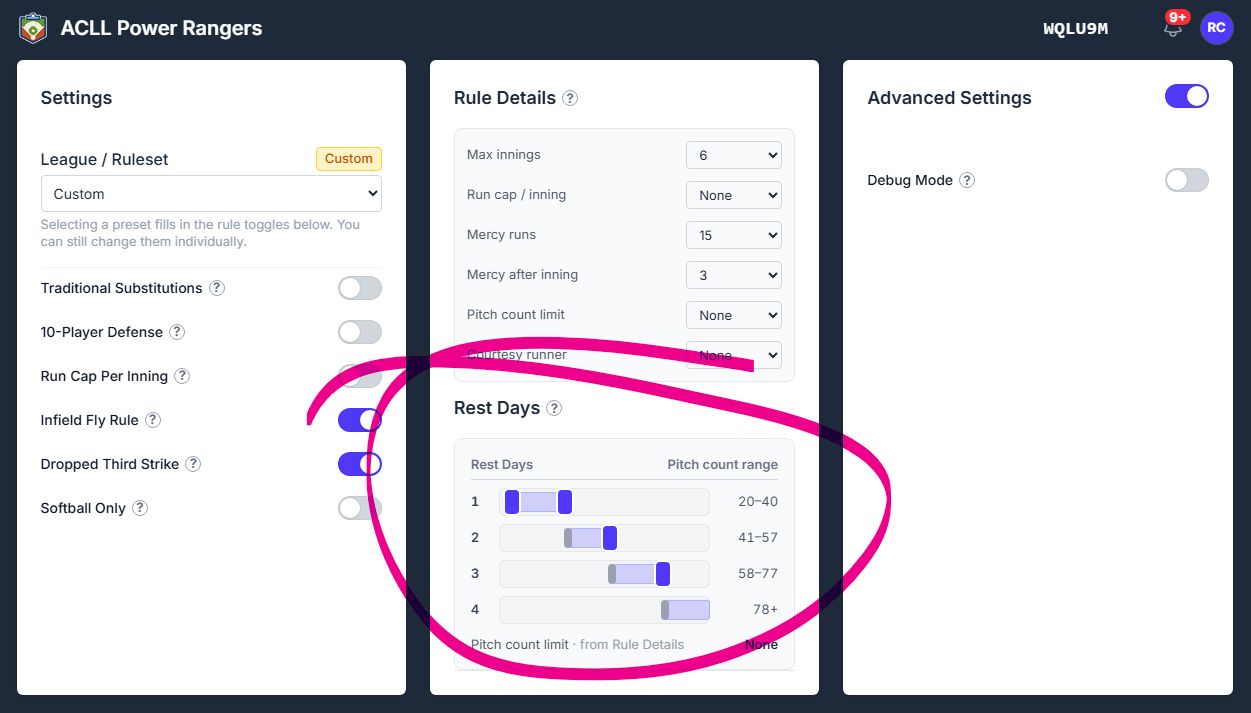
Rest thresholds come from Settings → Rest Days, so it's your league's rules, not ours. And that can be adjusted accordingly.
Two things I want to be explicit about:
If you haven't set a rest rule, the report says so instead of guessing. No rest requirement means no answer, and a workload report that invents an answer is worse than one that admits it doesn't have one.
The numbers are yours to verify. BenchBoard seeds rest rules from published guidance, but leagues differ and rules change. The catcher/pitcher pairing rule in particular — no pitching after catching four or more innings in a day, no catching after 41 or more pitches — is a starting point, not a ruling. Check it against your own league's handbook. It's in the panel, in writing, for the same reason.
5 & 6 Coming soon
Two more are designed but not built: Lineup Stability & Usage (batting order consistency, starts, late-game trust) and Bench Impact & Opportunity Cost (what actually happens when subs come in).
They're marked Coming Soon and that's all. No price on them, no upgrade button, no tier badge. If it isn't built, it doesn't get a checkout page — that's a rule now, not a preference.
The board looks different
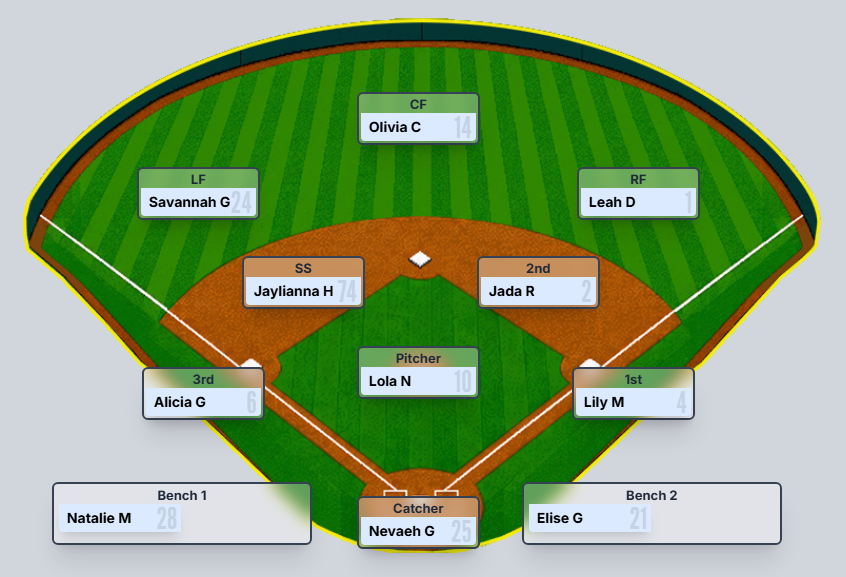
New field diagrams. Both baseball and softball, drawn properly, with correct infield geometry for each. The softball diamond is not the baseball diamond with the labels swapped — the mound distance and infield dirt are different, and now they look it. Flip Softball Only in settings and both modes change together.
New position cards. Every fielder card sits on its own dark plate, which reads much better against grass than the old white boxes did. The bench is a single slab now, with the cards square-edged except the bottom two, so it reads as one unit instead of a pile of separate pills.
Cards size to their content. This sounds like a nothing detail and it isn't: card heights are no longer hardcoded numbers that go stale. Change the text size and the card follows. It's why the board holds together at different sizes now instead of drifting a pixel at a time.
Desktop got Score mode. It could technically enter it before, but the board underneath stayed inert — you'd toggle and nothing happened. It's properly wired now, at desktop proportions.
Layout cleanup throughout. The lineup sits closer to the edge on tablet, dead space between the scoreboard and field is gone, the reserve rows are the same height as everything else, and a "Field 9 / Bench 2" counter that nobody used has been removed.
A clearer defense warning. When a reserve player is illegally holding a field position, the flag is now a yellow caution triangle with a black outline instead of a small red dot — legible at the size it actually appears, which the old one wasn't on a white lineup row.
What's next
Scorekeeping cleanup is the priority — the tap counts, the menu consistency, the scenarios that aren't wired yet. After that, a way into the Box Score, and batting stats surfaced as season totals rather than per-game rows.
If you're scoring games with this, I want to hear where it fights you. The rough edges I know about are listed above; the ones I don't know about are the ones I need.
App Store and Google Play
Yes. We know this is overdue but we're working hard to clean up what we got here. For now, give this a shot. We will make our way right into those stores soon.