
Opponents, Schedules and Logins - Oh My!

Hey Coaches! We've been busy making BenchBoard smoother and friendlier to use. Here's what's new in this update.
A cleaner way to add games
Scheduling a game just got easier on the eyes. The new "Add Game" screen gives everything room to breathe — pick home or away, choose your opponent, and set the date, time, and field, all on one tidy screen. You'll even see a quick preview of the matchup (like Eagles @ Sharks) as you fill it in.
Setting up opponents is smoother
- Searching for a team is faster, and you'll see helpful info — their city, season, and roster size — right away.
- Adding a brand-new opponent now just works. We squashed an annoying error some of you ran into.
- We also cut down on accidental duplicate teams, so your opponent list stays nice and clean.
Your schedule behaves itself now
- We fixed a sneaky bug where a game set for the evening near the end of a month could vanish from the calendar. It'll stay put now.
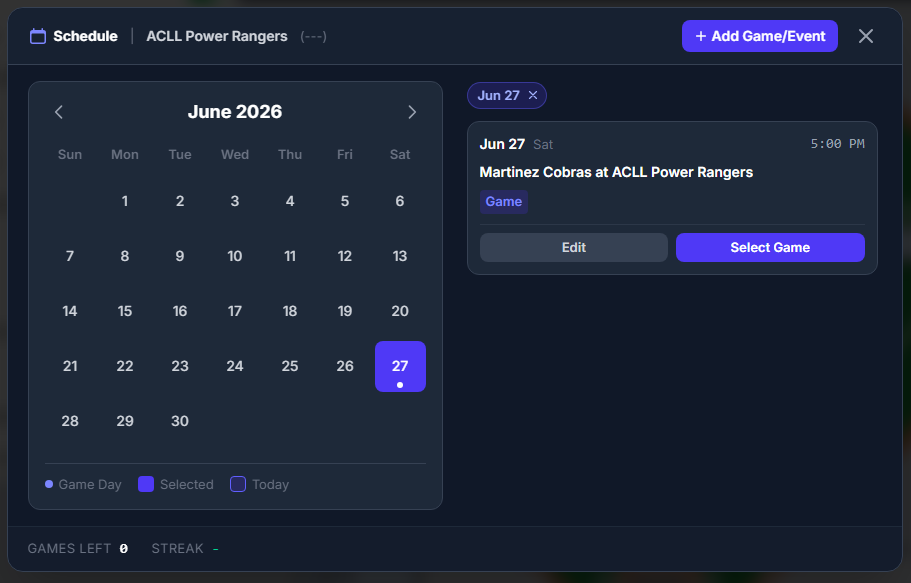
- The calendar's day view is clearer: tap a day to see just that day's games (shown as a little tag you can tap to clear), or view all your games and events at once.
New opponents come ready to go
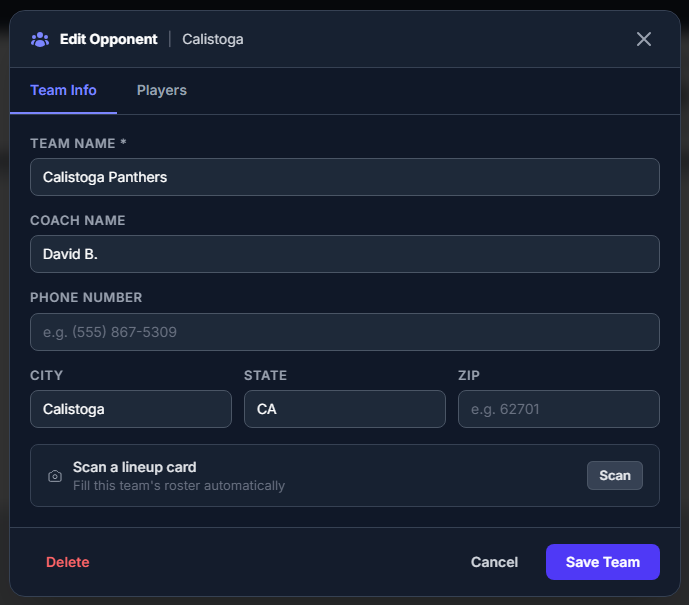
Every new opponent team now starts with a full set of roster spots, so they're ready for you to fill in — and it sets the stage for something we think you'll really like (keep reading 👀).
Smoother sign-ins
We fixed a hiccup that could occasionally get in the way when logging in. Getting into your account should be more reliable now.
Coming soon
We're working on a big one: snap a photo of the other team's lineup card and let BenchBoard fill in their roster for you — no more typing names by hand. We're building it to work even when the field has spotty cell service. More on that soon!
As always, thanks for coaching with BenchBoard. Got an idea or a gripe? We're all ears. ⚾
— Rad & The BenchBoard Team